
The landscape of Java Development has undergone a seismic shift over the last decade. Gone are the days when Java Deployment meant exclusively copying a WAR file into a heavy application server like WebSphere or WebLogic. Today, the ecosystem is dominated by lightweight, cloud-native architectures, containerization, and high-performance computing. As organizations migrate towards Java Microservices and serverless functions, the strategies for building, packaging, and deploying Java applications have evolved to prioritize speed, scalability, and observability.
With the release of Long-Term Support (LTS) versions like Java 17 and Java 21, the platform has become more robust, offering significant improvements in Java Performance and memory management. However, a new trend is emerging that challenges the traditional microservices split: the consolidation of workloads. Modern Java Architecture is now capable of handling intensive tasks—such as running transformer-based AI models—directly within the JVM. This eliminates the need for complex “sidecar” patterns or external Python REST wrappers, streamlining the deployment topology significantly.
In this comprehensive guide, we will explore the full spectrum of modern Java deployment. We will cover the essentials of packaging with Spring Boot, containerization strategies with Docker Java tools, and advanced techniques for deploying high-performance, AI-integrated applications. Whether you are focused on Java Backend systems, Java Enterprise solutions, or Android Development backends, understanding these deployment paradigms is crucial for success.
Section 1: The Foundation – Packaging and Build Artifacts
Before an application can be deployed, it must be built and packaged correctly. In the modern Java ecosystem, the “Uber JAR” (or Fat JAR) has become the standard unit of deployment, particularly within the Spring Boot framework. Unlike traditional deployments that relied on a pre-installed servlet container, an Uber JAR bundles the application code, dependencies, and an embedded server (like Tomcat, Jetty, or Undertow) into a single executable artifact.
Reliable deployment pipelines rely heavily on robust Java Build Tools like Java Maven or Java Gradle. These tools manage dependency resolution, compilation, and testing. A critical aspect of the build phase is ensuring that the code adheres to Java Best Practices and passes all unit tests using frameworks like JUnit and Mockito.
Let’s look at a modern Java application entry point. This example demonstrates how to structure a main class that initializes a Spring context, while using Java Streams to process startup arguments for environment configuration. This is a common pattern in Java Cloud deployments where configuration is injected dynamically.
package com.enterprise.deployment;

import org.springframework.boot.SpringApplication;
import org.springframework.boot.autoconfigure.SpringBootApplication;
import org.springframework.core.env.Environment;

import java.net.InetAddress;
import java.net.UnknownHostException;
import java.util.Arrays;
import java.util.Optional;
import java.util.logging.Logger;

/**
 * Main entry point for the Cloud-Native Java Application.
 * Demonstrates clean code practices and environment awareness.
 */
@SpringBootApplication
public class CloudDeploymentApplication {

    private static final Logger LOGGER = Logger.getLogger(CloudDeploymentApplication.class.getName());

    public static void main(String[] args) {
        SpringApplication app = new SpringApplication(CloudDeploymentApplication.class);
        Environment env = app.run(args).getEnvironment();

        logApplicationStartup(env, args);
    }

    /**
     * Logs application startup details using Java Streams to filter sensitive args.
     *
     * @param env  The Spring Environment
     * @param args The command line arguments
     */
    private static void logApplicationStartup(Environment env, String[] args) {
        String protocol = "http";
        if (env.getProperty("server.ssl.key-store") != null) {
            protocol = "https";
        }

        String port = env.getProperty("server.port", "8080");
        String contextPath = env.getProperty("server.servlet.context-path", "/");

        // Use Java Streams to process arguments for logging, masking potential secrets
        long sensitiveArgsCount = Arrays.stream(args)
                .filter(arg -> arg.startsWith("--spring.datasource.password") ||
                               arg.startsWith("--api.key"))
                .count();

        try {
            String hostAddress = InetAddress.getLocalHost().getHostAddress();
            LOGGER.info(String.format(
                    "\n----------------------------------------------------------\n\t" +
                            "Application '%s' is running! Access URLs:\n\t" +
                            "Local: \t\t%s://localhost:%s%s\n\t" +
                            "External: \t%s://%s:%s%s\n\t" +
                            "Profile(s): \t%s\n\t" +
                            "Masked Args: \t%d detected\n" +
                            "----------------------------------------------------------",
                    env.getProperty("spring.application.name"),
                    protocol, port, contextPath,
                    protocol, hostAddress, port, contextPath,
                    Arrays.toString(env.getActiveProfiles()),
                    sensitiveArgsCount
            ));
        } catch (UnknownHostException e) {
            LOGGER.warning("The host name could not be determined, using localhost as fallback");
        }
    }
}
In the code above, we see the convergence of Java Basics and Java Advanced concepts. We utilize Optional (implicitly via property retrieval), Java Streams for argument filtering, and proper exception handling. This sets the stage for a deployment that is self-aware and observability-friendly.
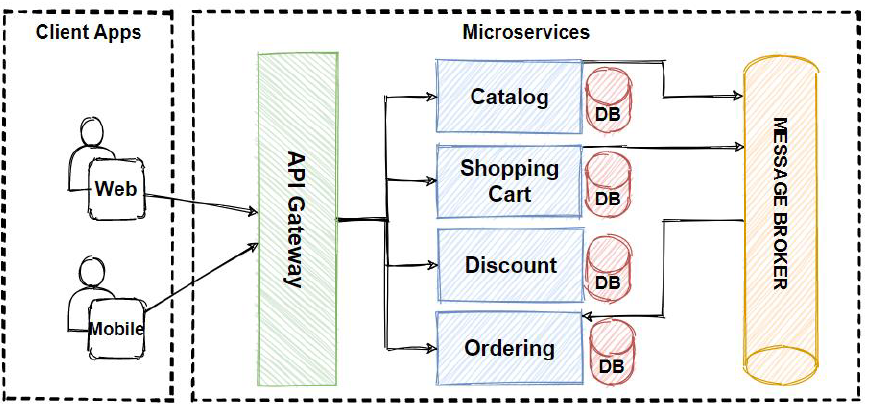
Section 2: Containerization and Kubernetes Orchestration
Once the artifact is built, the next step in modern Java DevOps is containerization. Docker Java workflows involve creating a Docker image that encapsulates the JVM, the application JAR, and any OS-level dependencies. This image ensures that the application runs identically in development, staging, and production environments.
However, simply wrapping a JAR in a container isn’t enough. You must consider JVM Tuning for container environments. Historically, the JVM struggled to recognize container resource limits (CPU and RAM), leading to OutOfMemoryErrors. Modern versions (Java 17+) have excellent container awareness (-XX:+UseContainerSupport), but developers must still carefully configure heap sizes and garbage collection algorithms (like G1GC or ZGC) to optimize Java Scalability.
When deploying to Kubernetes Java clusters, liveness and readiness probes are essential. These allow Kubernetes to know when to restart a container or when to stop sending traffic to it. While frameworks like Spring Boot Actuator provide these endpoints out of the box, implementing custom health checks for dependent services (like Java Database connections or external APIs) is a Java Best Practice.
Below is an example of a custom Health Indicator that checks the status of a hypothetical downstream AI inference service. This demonstrates Java Interface implementation and Java Exception handling in a deployment context.
package com.enterprise.deployment.health;

import org.springframework.boot.actuate.health.Health;
import org.springframework.boot.actuate.health.HealthIndicator;
import org.springframework.stereotype.Component;
import java.net.HttpURLConnection;
import java.net.URL;

/**
 * Custom HealthCheck for Kubernetes Readiness Probes.
 * Ensures the Inference Engine is reachable before accepting traffic.
 */
@Component
public class InferenceEngineHealthIndicator implements HealthIndicator {

    private static final String ENGINE_URL = "http://localhost:8081/v1/models/status";

    @Override
    public Health health() {
        try {
            if (checkEngineStatus()) {
                return Health.up()
                        .withDetail("service", "InferenceEngine")
                        .withDetail("status", "Model Loaded")
                        .build();
            } else {
                return Health.down()
                        .withDetail("service", "InferenceEngine")
                        .withDetail("reason", "Model not ready")
                        .build();
            }
        } catch (Exception e) {
            return Health.down(e)
                    .withDetail("service", "InferenceEngine")
                    .withDetail("error", "Connection Refused")
                    .build();
        }
    }

    private boolean checkEngineStatus() throws Exception {
        // Simulating a connection check to an internal or sidecar process
        URL url = new URL(ENGINE_URL);
        HttpURLConnection connection = (HttpURLConnection) url.openConnection();
        connection.setRequestMethod("GET");
        connection.setConnectTimeout(2000);

        int responseCode = connection.getResponseCode();
        return responseCode == 200;
    }
}
Section 3: Advanced Deployment – In-JVM AI and High Performance
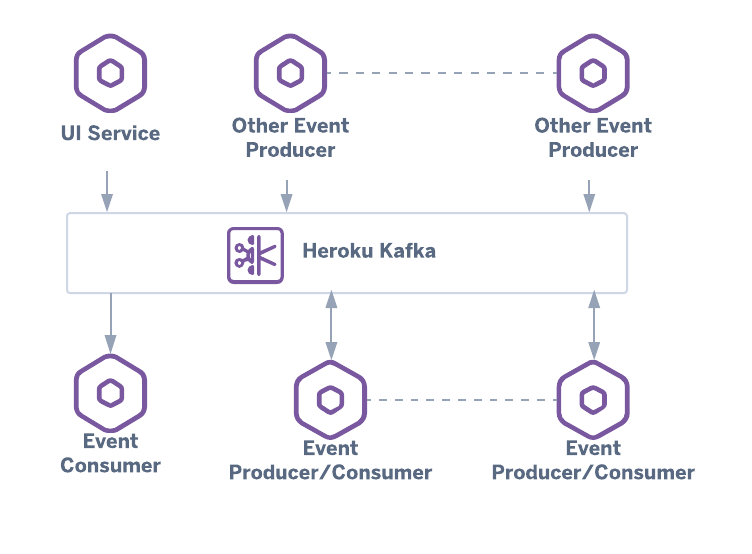
The frontier of Java Deployment is changing. Traditionally, if you wanted to integrate Machine Learning, you would deploy a Java Backend that communicates with a separate Python service via REST or gRPC. This adds latency, serialization overhead, and deployment complexity (managing two different technology stacks).
New capabilities allow Java apps to run transformer-based AI models and ONNX-powered inference directly within the JVM. This utilizes Java Native Access (JNA) or the newer Foreign Function & Memory API (Project Panama) to interface with high-performance C++ libraries or GPU accelerators without leaving the Java environment. This “Modular Deployment” approach simplifies the architecture: one JVM, one deployment artifact, zero network latency for inference.
This approach requires a solid understanding of Java Concurrency. AI inference can be blocking; therefore, offloading these tasks to specific thread pools using CompletableFuture is critical to keep the Java REST API responsive. Below is an example of a service layer that abstracts an AI model execution, using Java Generics to handle different input/output types and Java Async patterns.
package com.enterprise.deployment.ai;

import java.util.concurrent.CompletableFuture;
import java.util.concurrent.ExecutorService;
import java.util.concurrent.Executors;
import java.util.function.Function;
import java.util.List;
import java.util.ArrayList;

/**
 * Generic Interface for In-JVM Inference.
 * Allows swapping implementations (e.g., ONNX, TensorFlow Java) without changing business logic.
 *
 * @param  Input type
 * @param  Output type
 */
interface ModelInference {
    CompletableFuture predictAsync(I input);
}

/**
 * Implementation of an ONNX-backed inference service running inside the JVM.
 * Uses a dedicated thread pool to prevent blocking the main web threads.
 */
public class OnnxTransformerService implements ModelInference> {

    // Dedicated executor for compute-intensive AI tasks
    private final ExecutorService inferenceExecutor = Executors.newFixedThreadPool(
            Runtime.getRuntime().availableProcessors()
    );

    @Override
    public CompletableFuture> predictAsync(String inputText) {
        return CompletableFuture.supplyAsync(() -> {
            return executeNativeInference(inputText);
        }, inferenceExecutor);
    }

    /**
     * Simulates the native call to an ONNX Runtime loaded in the JVM.
     * In a real scenario, this would use the ONNX Java API.
     */
    private List executeNativeInference(String text) {
        // Simulate tokenization and processing delay
        try {
            // Mimic heavy computation
            Thread.sleep(50);
        } catch (InterruptedException e) {
            Thread.currentThread().interrupt();
            throw new RuntimeException("Inference interrupted", e);
        }

        // Mock output: Vector embeddings
        List embeddings = new ArrayList<>();
        embeddings.add(0.95f);
        embeddings.add(0.12f);
        embeddings.add(-0.45f);

        // Complex logic handled natively within the JVM process
        return embeddings;
    }

    /**
     * Cleanup resources when the application shuts down.
     */
    public void shutdown() {
        inferenceExecutor.shutdown();
    }
}
This code highlights Clean Code Java principles. By defining a generic interface, we decouple the specific AI implementation from the rest of the application. Using CompletableFuture ensures that our Java Web Development framework (like Spring WebFlux or standard MVC) remains non-blocking, which is vital for high-throughput Java Scalability.
Section 4: Best Practices, Security, and Optimization
Security and Identity
Deployment is not just about running code; it is about running code safely. Java Security is paramount. When deploying to AWS Java, Azure Java, or Google Cloud Java environments, never hardcode credentials. Use IAM roles or workload identity federation.
For application-level security, integrating Java Authentication mechanisms like OAuth Java and JWT Java (JSON Web Tokens) is standard. Ensure your deployment pipeline scans dependencies for vulnerabilities (using tools like OWASP Dependency Check) before building the final artifact.
Garbage Collection and Performance
Java Performance tuning is often the difference between a successful deployment and a costly one. For high-throughput applications, especially those handling data streams or AI inference, the choice of Garbage Collector matters:
- G1GC: The default for most server-class machines. Good balance of throughput and latency.
- ZGC: Available in newer Java versions. Designed for low latency (sub-millisecond pauses) on massive heaps. Ideal for Java Big Data applications.
- SerialGC: Best for small microservices with low memory footprints (under 512MB heap).
Furthermore, consider GraalVM and Native Images. While standard Java Deployment uses a JIT (Just-In-Time) compiler, Native Image compiles Java code ahead-of-time (AOT) into a standalone binary. This results in instant startup times and lower memory usage, making it perfect for serverless environments like AWS Lambda.
CI/CD Integration
A robust CI/CD Java pipeline is the backbone of modern deployment. Tools like Jenkins, GitLab CI, or GitHub Actions should automate the following steps:
- Checkout & Compile: Using Maven or Gradle.
- Test: Run Unit and Integration tests.
- Static Analysis: Check for code smells and security flaws.
- Containerize: Build the Docker image.
- Deploy: Push to the container registry and update the Kubernetes manifest.
Conclusion
Java Deployment has evolved from copying WAR files to mastering a complex ecosystem of containers, orchestrators, and high-performance computing. We have moved beyond simple CRUD applications to hosting sophisticated AI models directly within the JVM, leveraging the power of Java 21 and modern hardware acceleration. By adhering to Java Design Patterns, utilizing efficient packaging like Spring Boot Uber JARs, and optimizing for the container lifecycle, developers can build systems that are not only resilient but also incredibly fast.
As you modernize your Java Architecture, remember that deployment is a feature, not an afterthought. Whether you are integrating Hibernate for data persistence, securing APIs with Spring Security, or pushing the boundaries with in-process AI, the goal remains the same: delivering value to users reliably and efficiently. The future of Java is cloud-native, intelligent, and faster than ever.