
Introduction
In the vast ecosystem of Java Development, few topics are as critical and pervasive as security. As applications evolve from monolithic structures to distributed Java Microservices, the mechanisms we use to verify user identity—Authentication—have undergone a massive transformation. Whether you are building a simple Java REST API or a complex Java Enterprise system, understanding how to implement robust authentication is non-negotiable.
Authentication answers the question, “Who are you?” while its counterpart, Authorization, answers “What are you allowed to do?” In the early days of Java EE (now Jakarta EE), developers relied heavily on container-managed security and the Java Authentication and Authorization Service (JAAS). However, the modern landscape, dominated by Spring Boot and cloud-native architectures, demands more flexible, stateless, and scalable solutions.
This comprehensive guide explores the depths of Java Authentication. We will traverse from the fundamentals of Java Security to advanced implementations involving JWT Java (JSON Web Tokens) and Enterprise Single Sign-On (SSO) using SAML and OAuth2. We will leverage modern features from Java 17 and Java 21, utilize Java Streams for data processing, and adhere to Java Best Practices to ensure your applications are not only secure but also performant.
Section 1: The Evolution of Java Security and Core Concepts
Before diving into code, it is essential to understand the architectural shift in Java Backend development. Traditionally, Java Web Development relied on server-side sessions (JSESSIONID). When a user logged in, the server created a session object in memory. This works well for a single server instance but becomes a bottleneck in Java Cloud environments (like AWS Java or Google Cloud Java) where applications are containerized using Docker Java and orchestrated via Kubernetes Java.
The Principal and The Subject
At the core of Java Security APIs, we deal with the concept of a Principal (the identity) and a Subject (the grouping of related information and credentials). In modern Java Frameworks like Spring Security, these concepts are abstracted into the Authentication interface and the SecurityContext.
Let’s look at a foundational interface design. Even if you are using a framework, defining clear contracts is part of Clean Code Java. Here is how we might define an authentication service interface using Java Generics to allow for flexible credential types.
package com.enterprise.security;

import java.util.Optional;
import java.util.concurrent.CompletableFuture;

/**
 * A generic interface for authentication services.
 * Demonstrates Java Generics and Async programming patterns.
 *
 * @param <T> The type of the principal (User)
 * @param <C> The type of credentials (e.g., String password, Biometric data)
 */
public interface AuthenticationProvider<T, C> {

    /**
     * Authenticates a user based on the provided identifier and credentials.
     *
     * @param identifier The username or email
     * @param credentials The secret or token
     * @return An Optional containing the authenticated Principal if successful
     * @throws SecurityException if authentication fails due to system errors
     */
    Optional<T> authenticate(String identifier, C credentials);

    /**
     * Asynchronous authentication for high-performance non-blocking scenarios.
     * Useful in reactive Java architectures.
     *
     * @param identifier The username
     * @param credentials The credentials
     * @return A CompletableFuture for async processing
     */
    default CompletableFuture<T> authenticateAsync(String identifier, C credentials) {
        return CompletableFuture.supplyAsync(() ->
            authenticate(identifier, credentials)
                .orElseThrow(() -> new SecurityException("Invalid Credentials"))
        );
    }

    /**
     * Validates if the current session or token is still active.
     */
    boolean isValid(T principal);
}
This interface demonstrates the use of Java Generics for type safety and CompletableFuture for Java Async processing. Asynchronous authentication is particularly relevant when integrating with external Identity Providers (IdPs) where network latency can impact Java Performance.
Section 2: Implementing Authentication with Spring Security
Spring Boot has become the de facto standard for Java Enterprise applications. The Spring Security module provides a comprehensive security framework that handles authentication, authorization, and protection against common exploits.
Configuring the Security Filter Chain
In recent versions of Spring Security (aligned with Java 17+), the configuration has moved away from extending WebSecurityConfigurerAdapter to a more component-based approach using the SecurityFilterChain bean. This promotes better modularity and testability.
Below is a configuration example that sets up form-based login and secures API endpoints. It utilizes Java Lambda expressions to configure the HttpSecurity object, a style that is concise and readable.
package com.enterprise.config;

import org.springframework.context.annotation.Bean;
import org.springframework.context.annotation.Configuration;
import org.springframework.security.config.annotation.web.builders.HttpSecurity;
import org.springframework.security.config.annotation.web.configuration.EnableWebSecurity;
import org.springframework.security.crypto.bcrypt.BCryptPasswordEncoder;
import org.springframework.security.crypto.password.PasswordEncoder;
import org.springframework.security.web.SecurityFilterChain;

@Configuration
@EnableWebSecurity
public class SecurityConfig {

    /**
     * Configures the security filter chain.
     * Defines which URL paths should be secured and which should be public.
     */
    @Bean
    public SecurityFilterChain filterChain(HttpSecurity http) throws Exception {
        http
            .csrf(csrf -> csrf.disable()) // Disable CSRF for stateless REST APIs
            .authorizeHttpRequests(auth -> auth
                .requestMatchers("/api/public/**", "/auth/login").permitAll()
                .requestMatchers("/api/admin/**").hasRole("ADMIN")
                .anyRequest().authenticated()
            )
            // Configure Form Login for browser-based flows
            .formLogin(login -> login
                .loginPage("/auth/login")
                .defaultSuccessUrl("/dashboard", true)
                .permitAll()
            )
            // Configure HTTP Basic for simple API clients
            .httpBasic(basic -> {});

        return http.build();
    }

    /**
     * Bean for password encoding.
     * BCrypt is a standard best practice for Java Cryptography.
     */
    @Bean
    public PasswordEncoder passwordEncoder() {
        return new BCryptPasswordEncoder();
    }
}
This configuration highlights Java Best Practices by explicitly defining public versus protected endpoints. It also introduces the PasswordEncoder, a crucial component of Java Cryptography ensuring that passwords are never stored in plain text.
Connecting to the Database with JPA
To make authentication dynamic, we need to load users from a Java Database. We use JPA (Java Persistence API) and Hibernate to interact with the data layer. The UserDetailsService interface is the bridge between Spring Security and your domain model.
Here, we will use Java Streams to convert our custom Role entities into Spring Security’s GrantedAuthority objects.
package com.enterprise.service;

import com.enterprise.model.User;
import com.enterprise.repository.UserRepository;
import org.springframework.security.core.authority.SimpleGrantedAuthority;
import org.springframework.security.core.userdetails.UserDetails;
import org.springframework.security.core.userdetails.UserDetailsService;
import org.springframework.security.core.userdetails.UsernameNotFoundException;
import org.springframework.stereotype.Service;
import org.springframework.transaction.annotation.Transactional;

import java.util.List;
import java.util.stream.Collectors;

@Service
public class CustomUserDetailsService implements UserDetailsService {

    private final UserRepository userRepository;

    // Constructor injection for better testability (JUnit/Mockito)
    public CustomUserDetailsService(UserRepository userRepository) {
        this.userRepository = userRepository;
    }

    @Override
    @Transactional(readOnly = true)
    public UserDetails loadUserByUsername(String username) throws UsernameNotFoundException {
        User user = userRepository.findByUsername(username)
                .orElseThrow(() -> new UsernameNotFoundException("User not found: " + username));

        // Using Java Streams to map domain roles to security authorities
        List<SimpleGrantedAuthority> authorities = user.getRoles().stream()
                .map(role -> new SimpleGrantedAuthority(role.getName()))
                .collect(Collectors.toList());

        // Return a Spring Security User object
        return new org.springframework.security.core.userdetails.User(
                user.getUsername(),
                user.getPassword(),
                user.isEnabled(),
                true, true, true, // account non-expired, credentials non-expired, non-locked
                authorities
        );
    }
}
Section 3: Advanced Techniques – Stateless Auth and SSO
As we scale towards Java Microservices and Android Development (or any Mobile App Development), stateful sessions become problematic. This is where JWT Java (JSON Web Tokens) comes into play. A JWT allows the server to verify the user’s identity without querying the database for every request, significantly boosting Java Scalability.
Implementing JWT Authentication
A robust JWT implementation requires generating tokens upon login and validating them on subsequent requests. Below is a utility class that handles token generation using modern Java Time APIs.
package com.enterprise.security.jwt;

import io.jsonwebtoken.Claims;
import io.jsonwebtoken.Jwts;
import io.jsonwebtoken.SignatureAlgorithm;
import io.jsonwebtoken.security.Keys;
import org.springframework.stereotype.Component;

import java.security.Key;
import java.time.Instant;
import java.time.temporal.ChronoUnit;
import java.util.Date;
import java.util.HashMap;
import java.util.Map;
import java.util.function.Function;

@Component
public class JwtUtil {

    // In production, load this from a secure vault or environment variable
    private final Key SECRET_KEY = Keys.secretKeyFor(SignatureAlgorithm.HS256);

    public String generateToken(String username) {
        Map<String, Object> claims = new HashMap<>();
        return createToken(claims, username);
    }

    private String createToken(Map<String, Object> claims, String subject) {
        Instant now = Instant.now();
        return Jwts.builder()
                .setClaims(claims)
                .setSubject(subject)
                .setIssuedAt(Date.from(now))
                .setExpiration(Date.from(now.plus(10, ChronoUnit.HOURS))) // Java Time API
                .signWith(SECRET_KEY)
                .compact();
    }

    public Boolean validateToken(String token, String username) {
        final String extractedUsername = extractUsername(token);
        return (extractedUsername.equals(username) && !isTokenExpired(token));
    }

    public String extractUsername(String token) {
        return extractClaim(token, Claims::getSubject);
    }

    // Functional Java approach to claim extraction
    public <T> T extractClaim(String token, Function<Claims, T> claimsResolver) {
        final Claims claims = extractAllClaims(token);
        return claimsResolver.apply(claims);
    }

    private Claims extractAllClaims(String token) {
        return Jwts.parserBuilder()
                .setSigningKey(SECRET_KEY)
                .build()
                .parseClaimsJws(token)
                .getBody();
    }

    private Boolean isTokenExpired(String token) {
        return extractClaim(token, Claims::getExpiration).before(new Date());
    }
}
Enterprise SSO: SAML and OAuth2
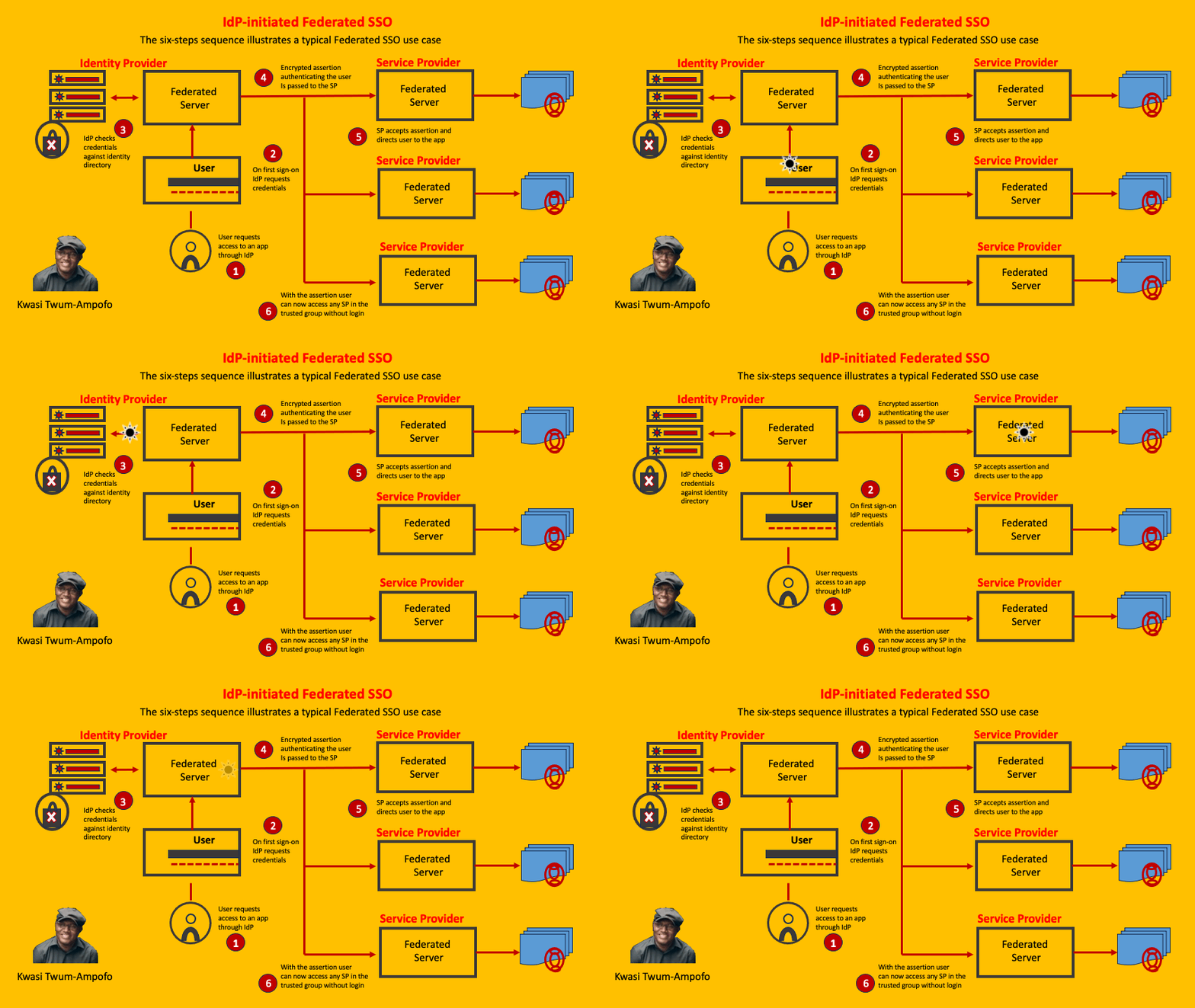
For enterprise applications, managing local users is often insufficient. Corporations require Single Sign-On (SSO) to allow employees to access multiple applications with one set of credentials. This is achieved via protocols like SAML (Security Assertion Markup Language) or OAuth2/OIDC.
Spring Boot makes integrating these protocols seamless. While SAML is XML-heavy and traditional, OAuth2 is the modern standard for OAuth Java implementations. When you enable SSO, your Java application delegates authentication to an Identity Provider (IdP) like Okta, Keycloak, or Azure AD.
To enable OAuth2 login in a Spring Boot application, the configuration is often declarative. You define the provider details in your application.yml or application.properties. This is a key aspect of Java DevOps and CI/CD Java pipelines, as these configurations can be injected during deployment.
spring:
  security:
    oauth2:
      client:
        registration:
          google:
            client-id: ${GOOGLE_CLIENT_ID}
            client-secret: ${GOOGLE_CLIENT_SECRET}
            scope: profile, email
          github:
            client-id: ${GITHUB_CLIENT_ID}
            client-secret: ${GITHUB_CLIENT_SECRET}
            scope: user:email
        provider:
          google:
            authorization-uri: https://accounts.google.com/o/oauth2/v2/auth
            token-uri: https://oauth2.googleapis.com/token
            user-info-uri: https://www.googleapis.com/oauth2/v3/userinfo
By simply adding the spring-boot-starter-oauth2-client dependency and this configuration, Spring Boot automatically sets up the authentication flow, handles the callback, and creates an authentication principal based on the user info returned from Google or GitHub.
Section 4: Best Practices and Optimization
Implementing authentication is not just about making it work; it is about making it secure and efficient. Here are critical best practices for Java Development in the context of security.
1. Secure Password Storage
Never store passwords in plain text. Always use strong hashing algorithms like BCrypt, SCrypt, or Argon2. In Java Spring, the BCryptPasswordEncoder handles salting and hashing automatically. This protects your users even if your Java Database is compromised.
2. Java Performance and Caching
Fetching user details and permissions from the database for every HTTP request (in a stateless API) can be expensive. To optimize Java Performance, consider caching the UserDetails object. You can use Java Collections (like ConcurrentHashMap for simple cases) or robust caching solutions like Redis or Hazelcast.
However, be careful with cache invalidation. If a user’s role changes or they are banned, the cache must be updated immediately to prevent unauthorized access.
3. Testing Security
Security configurations must be tested. Use JUnit and Mockito alongside Spring Security Test to simulate authenticated users. Ensure that your API endpoints correctly reject unauthenticated requests and forbid users with insufficient privileges.
// Example of a Security Test using MockMvc
@Test
@WithMockUser(username = "admin", roles = {"ADMIN"})
void whenAdminAccessAdminEndpoint_thenSuccess() throws Exception {
    mockMvc.perform(get("/api/admin/users"))
           .andExpect(status().isOk());
}

@Test
@WithMockUser(username = "user", roles = {"USER"})
void whenUserAccessAdminEndpoint_thenForbidden() throws Exception {
    mockMvc.perform(get("/api/admin/users"))
           .andExpect(status().isForbidden());
}
4. Exception Handling
Proper Java Exceptions handling is vital. Do not expose stack traces to the client. Use a global exception handler (@ControllerAdvice) to catch AuthenticationException or AccessDeniedException and return a standardized, safe JSON response. This prevents leaking internal architecture details which could be used by attackers.
Conclusion
Java Authentication is a vast field that bridges the gap between basic user verification and complex, enterprise-grade identity management. We have journeyed through the core concepts of the Principal/Subject model, implemented modern security chains with Spring Boot, explored stateless architecture with JWT Java, and touched upon the configuration of OAuth2 for SSO.
As you continue your journey in Java Backend development, remember that security is a process, not a product. Whether you are deploying to AWS Java environments, optimizing JVM Tuning for high-throughput authentication services, or building the next generation of Android Java applications, the principles of secure coding remain the same.
Stay updated with the latest versions of Java 21 and Spring Security, as the ecosystem is constantly evolving to combat new threats. By adhering to Java Best Practices, utilizing Java Build Tools like Java Maven or Java Gradle for dependency management, and writing clean, testable code, you ensure that your applications remain a fortress in an increasingly hostile digital landscape.