
Introduction: The Evolution of Cloud-Native Java
The landscape of Java Development has undergone a seismic shift over the last decade. Gone are the days when Java Enterprise applications were solely synonymous with massive monolithic WAR files deployed on heavy application servers. Today, the paradigm has shifted towards Java Cloud development, characterized by lightweight, scalable, and resilient microservices. With the advent of Java 17 and Java 21, the language has evolved to embrace modern architectural patterns, making it a premier choice for cloud-native solutions.
At the heart of this transformation is the synergy between Spring Boot and cloud providers like Azure Java, AWS Java, and Google Cloud Java. Specifically, the integration of messaging systems and event streams has become critical for decoupling services. In a distributed architecture, services must communicate asynchronously to ensure Java Scalability and fault tolerance. This is where frameworks like Spring Cloud Stream come into play, abstracting the complexities of message brokers such as Apache Kafka or Azure Event Hubs.
This article provides a comprehensive technical deep dive into building event-driven architectures using modern Java. We will explore how to leverage the latest SDKs to connect Java Microservices, manage data streams, and deploy robust applications using Docker Java and Kubernetes Java strategies. Whether you are transitioning from Java EE/Jakarta EE or are a seasoned cloud developer, understanding these patterns is essential for mastering the modern Java Backend.
Section 1: Core Concepts of Event-Driven Java Cloud Architecture
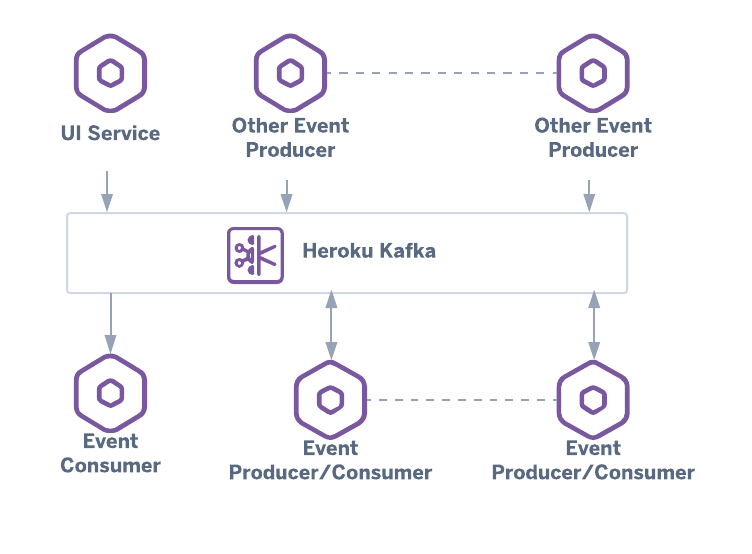
Before diving into the code, it is crucial to understand the architectural components that make Java Cloud applications successful. The traditional request-response model (often implemented via Java REST API) is synchronous. While effective for direct user interactions, it can create bottlenecks in backend-to-backend communication. If Service A calls Service B, and Service B is slow, Service A hangs. This cascades, leading to poor Java Performance.
Event-driven architecture flips this model. Instead of asking for work to be done, a service publishes an event stating that something has happened. This requires a robust binding mechanism. In the Spring ecosystem, this is handled by “Binders.” A Binder is a specific implementation that connects the abstract concept of a message channel to a physical destination, such as an Azure Event Hub or a RabbitMQ exchange.
Modern Data Modeling with Java Records
With Java 17 and newer versions, we should leverage Java Best Practices by using Records for our data transfer objects (DTOs). Records provide a concise syntax for immutable data carriers, which are perfect for event messages that should not change once published.
Here is how we define a domain event for a cloud-based inventory system. This demonstrates Clean Code Java principles by reducing boilerplate.
package com.example.inventory.events;

import java.io.Serializable;
import java.time.Instant;

/**
 * A robust, immutable event record representing a stock update.
 * Implements Serializable for easier object transmission across the network.
 */
public record InventoryUpdateEvent(
    String productId,
    String warehouseId,
    int quantityChange,
    UpdateType type,
    Instant timestamp
) implements Serializable {

    // Compact Constructor for validation
    public InventoryUpdateEvent {
        if (productId == null || productId.isBlank()) {
            throw new IllegalArgumentException("Product ID cannot be null or empty");
        }
        if (timestamp == null) {
            timestamp = Instant.now();
        }
    }

    public enum UpdateType {
        RESTOCK,
        SALE,
        RETURN,
        ADJUSTMENT
    }
}
This simple structure is the bedrock of our messaging strategy. By using strong typing and enums, we ensure type safety across our Java Architecture.
Section 2: Implementing Producers with Spring Cloud Stream
To publish messages to a cloud environment like Azure, we need to bridge the gap between our imperative application logic (like a user clicking a button) and the reactive, asynchronous nature of streams. Spring Cloud Stream provides a powerful utility called StreamBridge for this purpose.
Apple AirTag on keychain – Protective Case For Apple Airtag Air Tag Carbon Fiber Silicone …
This approach allows developers to stick to familiar Java Web Development patterns, such as building a standard REST Controller, while offloading the complexity of the messaging protocol to the framework. The framework handles the connection to the cloud resource (e.g., an Event Hub), serialization (converting Java objects to JSON/Avro), and error handling.
The Producer Service
Below is an example of a service that acts as an event producer. It uses Java Dependency Injection to access the StreamBridge. Note the use of Java Generics implicitly handled by the framework during serialization.
package com.example.inventory.service;

import com.example.inventory.events.InventoryUpdateEvent;
import org.slf4j.Logger;
import org.slf4j.LoggerFactory;
import org.springframework.cloud.stream.function.StreamBridge;
import org.springframework.stereotype.Service;
import org.springframework.util.MimeTypeUtils;

import java.time.Instant;
import java.util.UUID;

@Service
public class InventoryPublisher {

    private static final Logger log = LoggerFactory.getLogger(InventoryPublisher.class);
    private final StreamBridge streamBridge;

    // Constructor injection for better testing support (Mocking)
    public InventoryPublisher(StreamBridge streamBridge) {
        this.streamBridge = streamBridge;
    }

    /**
     * Publishes an inventory change to the configured binding.
     *
     * @param productId The ID of the product
     * @param amount The amount changed
     * @return boolean indicating submission success
     */
    public boolean publishStockUpdate(String productId, int amount) {
        log.info("Preparing to publish stock update for product: {}", productId);

        // Create the event record
        var event = new InventoryUpdateEvent(
            productId,
            "WH-US-EAST-" + UUID.randomUUID().toString().substring(0, 8),
            amount,
            amount > 0 ? InventoryUpdateEvent.UpdateType.RESTOCK : InventoryUpdateEvent.UpdateType.SALE,
            Instant.now()
        );

        // "inventory-out-0" is the binding name defined in application.yaml
        // This decouples the code from the actual topic/event-hub name
        boolean result = streamBridge.send("inventory-out-0", event, MimeTypeUtils.APPLICATION_JSON);

        if (result) {
            log.debug("Event successfully sent to the broker.");
        } else {
            log.error("Failed to send event to the broker.");
        }

        return result;
    }
}
In a real-world scenario, you would configure the `inventory-out-0` binding in your configuration file to point to a specific Azure Event Hub or Kafka topic. This separation of concerns is a hallmark of Java Best Practices in cloud development.
Section 3: Consuming Events with Functional Java
Modern Spring Cloud implementation relies heavily on Functional Java. Instead of using annotation-heavy classes with `@StreamListener` (which is now deprecated), we utilize the `java.util.function` interfaces: `Supplier`, `Function`, and `Consumer`. This aligns perfectly with the functional programming enhancements introduced in Java 8 and refined in later versions.
When consuming data from a high-throughput source like Azure Event Hubs, we often need to process batches or perform complex transformations. The following example demonstrates a Consumer bean that processes incoming inventory events. We will also integrate Java Streams API to perform logic on the data.
The Functional Consumer
This consumer listens to the stream, filters out invalid entries, and logs high-value transactions. This demonstrates how Java Lambda expressions make code more readable and concise.
package com.example.inventory.processor;

import com.example.inventory.events.InventoryUpdateEvent;
import org.slf4j.Logger;
import org.slf4j.LoggerFactory;
import org.springframework.context.annotation.Bean;
import org.springframework.context.annotation.Configuration;

import java.util.function.Consumer;

@Configuration
public class InventoryProcessorConfiguration {

    private static final Logger log = LoggerFactory.getLogger(InventoryProcessorConfiguration.class);

    @Bean
    public Consumer processInventory() {
        return event -> {
            // Basic validation using Functional style
            if (event.quantityChange() == 0) {
                log.warn("Received zero quantity change for event, skipping.");
                return;
            }

            log.info("Processing event type: {} for Product: {}", event.type(), event.productId());

            // Simulate business logic, e.g., updating a local database via JPA
            performBusinessLogic(event);
        };
    }

    private void performBusinessLogic(InventoryUpdateEvent event) {
        // Example: Check for high volume movement
        if (Math.abs(event.quantityChange()) > 100) {
            triggerAuditLog(event);
        }
    }

    private void triggerAuditLog(InventoryUpdateEvent event) {
        log.warn("AUDIT ALERT: Large inventory movement detected in warehouse {}", event.warehouseId());
        // Logic to write to an audit table using Hibernate/JPA would go here
    }
}
By defining the consumer as a Bean, the underlying binder (e.g., the Azure SDK binder) automatically subscribes to the event hub, handles the offset checkpointing, and invokes this lambda function whenever a message arrives. This creates a seamless Java DevOps pipeline where infrastructure concerns are handled by the platform, and business logic is handled by the developer.
Section 4: Advanced Techniques – Reactive Streams and Error Handling
For high-performance Java Cloud applications, imperative blocking code (waiting for a database or API) can be a killer. To achieve true Java Scalability, developers are turning to Reactive Programming using Project Reactor (Flux and Mono). This is particularly relevant when using Azure SDKs, which are built from the ground up to be reactive.
Reactive consumers allow you to process messages asynchronously and non-blocking. This is vital when your service needs to handle thousands of events per second without exhausting thread pools. This relates closely to Java Concurrency and Java Async concepts.
Reactive Processor with Flux
Here is an example of a Processor (a `Function`) that receives a stream of data, transforms it, and outputs it to a new stream. This uses `Flux` from Project Reactor.
package com.example.inventory.reactive;

import com.example.inventory.events.InventoryUpdateEvent;
import org.slf4j.Logger;
import org.slf4j.LoggerFactory;
import org.springframework.context.annotation.Bean;
import org.springframework.context.annotation.Configuration;
import reactor.core.publisher.Flux;

import java.time.Duration;
import java.util.function.Function;

@Configuration
public class ReactiveAnalyticsConfiguration {

    private static final Logger log = LoggerFactory.getLogger(ReactiveAnalyticsConfiguration.class);

    /**
     * A Reactive Function that consumes a Flux of events and emits a Flux of Strings (Analytics).
     * This leverages non-blocking backpressure.
     */
    @Bean
    public Function, Flux> analyticsProcessor() {
        return flux -> flux
                // Windowing: Group events happening within 10 seconds
                .window(Duration.ofSeconds(10))
                .flatMap(window -> window
                    .map(event -> event.productId())
                    .distinct()
                    .count()
                    .map(count -> "Unique products updated in last 10s: " + count)
                )
                .doOnNext(stat -> log.info("Real-time Analytics: {}", stat))
                .doOnError(e -> log.error("Error in reactive stream", e));
    }
}
In this advanced example, we aren’t just processing one message at a time; we are performing windowed analytics on the stream in real-time. This is a common pattern in Big Data and IoT scenarios often hosted on Azure or AWS.
Section 5: Best Practices, Optimization, and Deployment
Building the application is only half the battle. To ensure your Java Cloud solution is production-ready, you must consider Java Optimization, security, and deployment strategies.
1. JVM Tuning and Garbage Collection
Running Java in containers (Docker/Kubernetes) requires awareness of memory limits. The default Garbage Collection (G1GC or ZGC in newer Java versions) is generally efficient, but in a constrained cloud environment, you should ensure your JVM is aware of the container limits. Use the flag -XX:+UseContainerSupport (default in recent versions) and consider ZGC for low-latency streaming applications.
2. Security and Authentication
Never hardcode credentials. When connecting to Azure Event Hubs or other cloud resources, use Managed Identities or OAuth Java flows. Spring Cloud Azure supports Passwordless connections, where the application authenticates using the environment’s identity rather than a connection string. This significantly improves Java Security.
3. Build Tools and CI/CD
Use Java Maven or Java Gradle to manage dependencies efficiently. Specifically, manage your “Bill of Materials” (BOM) for Spring Cloud and Azure SDKs to ensure version compatibility. A mismatch in binder versions can lead to serialization errors.
            org.springframework.cloud
            spring-cloud-dependencies
            2023.0.0
            pom
            import


            com.azure.spring
            spring-cloud-azure-dependencies
            5.8.0
            pom
            import
4. Observability
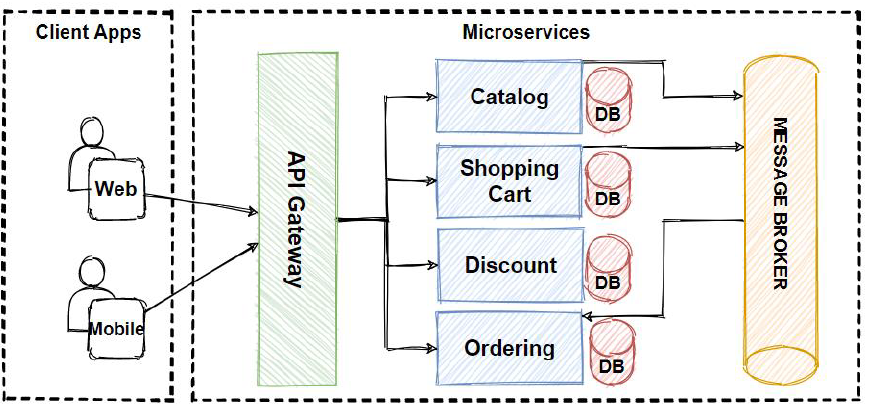
In a microservices architecture, you cannot debug by stepping through code locally. You must implement distributed tracing. Use Micrometer and OpenTelemetry to export metrics and traces to Azure Monitor or Prometheus. This allows you to visualize the flow of your events from the Producer, through the Event Hub, to the Consumer.
Conclusion
The convergence of Java 21, Spring Boot, and cloud-native SDKs has democratized the creation of highly scalable, event-driven systems. By leveraging the abstraction layers provided by Spring Cloud Stream and the robust infrastructure of providers like Azure, developers can focus on business logic rather than plumbing.
We have explored how to model data with Records, produce events using `StreamBridge`, consume them with functional interfaces, and even handle complex flows with Reactive programming. As you move forward with your Java Development journey, remember that the cloud is not just a hosting environment—it is an architectural style. Embracing asynchronous communication, loose coupling, and automated CI/CD Java pipelines will ensure your applications remain resilient and maintainable in the long run.
Whether you are building the next big Android Java backend or a complex enterprise data pipeline, the tools available today make it an exciting time to be a Java developer. Start small, experiment with the code examples provided, and gradually scale your event-driven architecture.