
In the landscape of Java Development, few topics spark as much debate and require as much discipline as exception handling. Whether you are building high-performance Java Microservices with Spring Boot or maintaining legacy Java Enterprise systems, the way you handle errors determines the resilience and maintainability of your application. Java’s approach to exceptions—specifically the distinction between checked and unchecked exceptions—sets it apart from many other languages. While this design choice enforces a contract between API designers and consumers, it also introduces complexity that requires a deep understanding of Java Architecture and Clean Code Java principles.
Effective exception handling is not just about preventing crashes; it is about flow control, resource management, and providing meaningful feedback to clients, whether they are end-users or other services in a Java Cloud environment like AWS Java or Kubernetes Java clusters. In this comprehensive guide, we will explore the hierarchy of the Java exception model, dive into implementation details with Java 17 and Java 21 features, and examine advanced patterns for Java Streams and asynchronous programming.
The Java Exception Hierarchy: Core Concepts
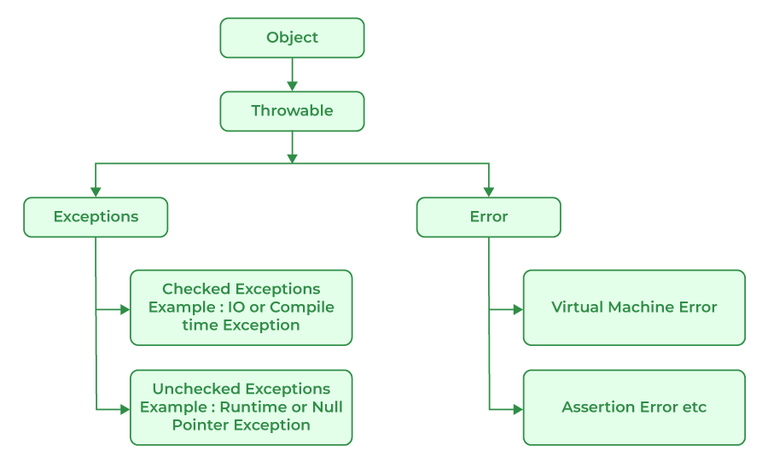
To write robust Java Backend code, one must first understand the hierarchy rooted in the Throwable class. The Java Virtual Machine (JVM) divides problems into two main categories: Errors and Exceptions.
Errors vs. Exceptions
Errors (subclasses of java.lang.Error) indicate serious problems that a reasonable application should not try to catch. These are usually environmental or system-level issues, such as OutOfMemoryError or StackOverflowError. These relate closely to JVM Tuning and Garbage Collection mechanics. In almost all cases, when an Error occurs, the application state is compromised, and the best course of action is to let the application crash and restart, perhaps triggering an alert via your Java DevOps pipeline.
Exceptions, on the other hand, represent conditions that an application might want to catch and handle. This branch is further divided into:
- Checked Exceptions: These are exceptions that inherit from
Exceptionbut notRuntimeException. The compiler forces you to handle them (usingtry-catch) or declare them in the method signature (throws). Examples includeIOExceptionandSQLException(common in JDBC interactions). - Unchecked Exceptions: These inherit from
RuntimeException. They usually represent programming errors, such asNullPointerExceptionorIllegalArgumentException. The compiler does not enforce handling them.
Modern Resource Management
One of the most significant improvements in Java Basics regarding exceptions was the introduction of “try-with-resources” in Java 7, which implements the AutoCloseable interface. This is crucial for preventing memory leaks in Java Database connections or file I/O operations.
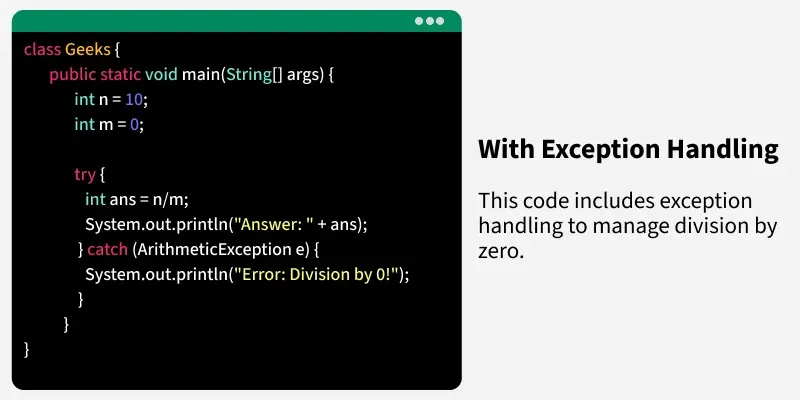
Here is a practical example demonstrating how to handle checked exceptions while ensuring resources are closed, a staple in Java Best Practices:
Executive leaving office building – Exclusive | China Blocks Executive at U.S. Firm Kroll From Leaving …
import java.io.BufferedReader;
import java.io.FileReader;
import java.io.IOException;
import java.sql.SQLException;
import java.util.ArrayList;
import java.util.List;
import java.util.logging.Logger;

public class ResourceManager {

    private static final Logger LOGGER = Logger.getLogger(ResourceManager.class.getName());

    /**
     * Reads a file and processes content.
     * Demonstrates try-with-resources and multi-catch (Java 7+).
     */
    public List readFileSafely(String path) throws BusinessProcessingException {
        List lines = new ArrayList<>();

        // The resources declared in the parenthesis are automatically closed
        // regardless of whether the try block completes normally or abruptly.
        try (BufferedReader br = new BufferedReader(new FileReader(path))) {
            String line;
            while ((line = br.readLine()) != null) {
                lines.add(line);
            }
        } catch (IOException | IllegalArgumentException e) {
            // Log the stack trace for debugging
            LOGGER.severe("Failed to read file: " + e.getMessage());

            // Wrap and rethrow as a custom exception to decouple the caller from low-level details
            throw new BusinessProcessingException("Unable to process configuration file", e);
        }

        return lines;
    }

    // Custom checked exception
    public static class BusinessProcessingException extends Exception {
        public BusinessProcessingException(String message, Throwable cause) {
            super(message, cause);
        }
    }
}
Implementation Strategies in Enterprise Architecture
When designing Java Architecture for large-scale systems, simply catching exceptions isn’t enough. You need a strategy for propagation and translation. In modern frameworks like Spring Boot and libraries like Hibernate or JPA, the trend has shifted heavily toward using unchecked exceptions.
Exception Translation and Layering
A common anti-pattern is letting low-level exceptions bubble up to the UI or API layer. A SQLException from JDBC should not be visible to a REST client. Instead, the Data Access Object (DAO) layer should catch implementation-specific exceptions and throw a generic Data Access exception. The Service layer should then catch that and throw a Business exception.
Below is an example of a Service Layer implementation in a Java Spring application that handles validation and business logic errors:
import org.springframework.stereotype.Service;
import java.util.Optional;

@Service
public class UserService {

    private final UserRepository userRepository;

    public UserService(UserRepository userRepository) {
        this.userRepository = userRepository;
    }

    /**
     * Registers a new user.
     * Throws runtime exceptions to be handled by a global handler.
     */
    public UserDTO registerUser(UserRegistrationRequest request) {
        // 1. Validation Logic
        if (request.email() == null || !request.email().contains("@")) {
            throw new InvalidInputException("Invalid email format provided.");
        }

        // 2. Business Logic Check
        Optional existingUser = userRepository.findByEmail(request.email());
        if (existingUser.isPresent()) {
            throw new UserAlreadyExistsException("User with email " + request.email() + " already exists.");
        }

        // 3. Persistence
        try {
            User newUser = new User(request.email(), request.password());
            User savedUser = userRepository.save(newUser);
            return mapToDTO(savedUser);
        } catch (Exception e) {
            // Catching generic persistence errors and wrapping them
            throw new SystemServiceException("Database unavailable during registration", e);
        }
    }

    private UserDTO mapToDTO(User user) {
        return new UserDTO(user.getId(), user.getEmail());
    }
}

// Runtime exceptions keep code clean by avoiding method signature pollution
class UserAlreadyExistsException extends RuntimeException {
    public UserAlreadyExistsException(String message) { super(message); }
}

class InvalidInputException extends RuntimeException {
    public InvalidInputException(String message) { super(message); }
}

class SystemServiceException extends RuntimeException {
    public SystemServiceException(String message, Throwable cause) { super(message, cause); }
}
In this example, we utilize unchecked exceptions. This keeps the code clean and fits well with Java Web Development frameworks where a global error handler intercepts these runtime exceptions to format the HTTP response.
Advanced Techniques: Streams and Asynchronous Java
With the advent of Java 8, Java Streams, and Functional Java programming, exception handling became trickier. The functional interfaces used in streams (like Function<T, R> or Consumer<T>) do not allow throwing checked exceptions. This creates friction when trying to perform operations like file parsing or Java Cryptography inside a lambda.
Handling Exceptions in Lambdas
To handle checked exceptions in streams, developers often resort to “sneaky throws” or wrapping exceptions. A cleaner approach is to create a custom functional interface or a wrapper utility. This is particularly useful in Java Data Processing pipelines.
import java.util.Arrays;
import java.util.List;
import java.util.function.Function;
import java.util.stream.Collectors;

public class StreamExceptionHandling {

    public void processUrls() {
        List urls = Arrays.asList("https://www.google.com", "malformed-url", "https://www.openai.com");

        List content = urls.stream()
            // We cannot simply call fetchContent(url) if it throws IOException
            // We must wrap it.
            .map(wrapper(this::fetchContent))
            .collect(Collectors.toList());
    }

    // A method that throws a Checked Exception
    private String fetchContent(String url) throws Exception {
        if (url.equals("malformed-url")) {
            throw new Exception("Network error for " + url);
        }
        return "Content of " + url;
    }

    /**
     * A generic wrapper to convert Checked Exceptions into RuntimeExceptions
     * allowing them to be used inside Stream operations.
     */
    static  Function wrapper(ThrowingFunction throwingFunction) {
        return i -> {
            try {
                return throwingFunction.apply(i);
            } catch (Exception ex) {
                // Wrap in a RuntimeException (unchecked)
                throw new RuntimeException(ex);
            }
        };
    }

    // Functional Interface that allows exceptions
    @FunctionalInterface
    public interface ThrowingFunction {
        R apply(T t) throws E;
    }
}
Async Error Handling with CompletableFuture
Executive leaving office building – After a Prolonged Closure, the Studio Museum in Harlem Moves Into …
In Java Concurrency and asynchronous programming, specifically when using CompletableFuture, exceptions behave differently. If an exception occurs in a separate thread, it is captured and stored in the future. You must handle it using methods like exceptionally or handle. This is vital for Java Scalability and non-blocking I/O operations.
import java.util.concurrent.CompletableFuture;
import java.util.concurrent.ExecutionException;

public class AsyncErrorHandler {

    public void executeAsyncTask() {
        CompletableFuture.supplyAsync(() -> {
            if (System.currentTimeMillis() % 2 == 0) {
                throw new RuntimeException("Service unavailable");
            }
            return "Success payload";
        })
        .handle((result, ex) -> {
            if (ex != null) {
                System.err.println("Async task failed: " + ex.getMessage());
                return "Fallback payload"; // Recover with default value
            }
            return result;
        })
        .thenAccept(payload -> System.out.println("Final result: " + payload));
    }
}
Best Practices and Optimization
To ensure your Java Application remains performant and maintainable, adhere to these best practices tailored for modern Java Development.
1. Global Exception Handling in Spring Boot
In Java REST API development, avoid writing try-catch blocks in every controller. Use @ControllerAdvice to handle exceptions globally. This promotes the DRY (Don’t Repeat Yourself) principle and ensures consistent API error responses (e.g., always returning a JSON object with a timestamp, error code, and message).
import org.springframework.http.HttpStatus;
import org.springframework.http.ResponseEntity;
import org.springframework.web.bind.annotation.ControllerAdvice;
import org.springframework.web.bind.annotation.ExceptionHandler;
import java.time.LocalDateTime;
import java.util.Map;
@ControllerAdvice
public class GlobalExceptionHandler {
@ExceptionHandler(UserAlreadyExistsException.class)
public ResponseEntity2. Performance Considerations
Java Performance can be impacted by excessive exception throwing. Constructing an exception is expensive because the JVM must capture the entire stack trace. In high-throughput scenarios, such as Java Mobile backends or Android Development, avoid using exceptions for flow control (e.g., don’t throw an exception just to exit a loop). If you need an exception but don’t need the stack trace (e.g., for a known business rule failure), you can override the fillInStackTrace() method to improve performance, though this is an advanced optimization.
Executive leaving office building – Exclusive | Bank of New York Mellon Approached Northern Trust to …
3. Testing and Observability
Your Java Testing strategy must include negative test cases. Use JUnit and Mockito to verify that your code throws the expected exceptions under failure conditions. Furthermore, in a CI/CD Java environment, ensure that exceptions are logged correctly using frameworks like SLF4J and Logback. Logs should include correlation IDs to trace requests across Java Microservices.
Conclusion
Mastering Java exceptions is a journey that moves from understanding basic syntax to designing resilient Java Enterprise architectures. While the debate between checked and unchecked exceptions continues among language designers, the industry standard for modern Java Frameworks like Spring leans heavily towards runtime exceptions for cleaner code and better modularity.
By implementing proper exception hierarchies, utilizing global handlers, and respecting the functional programming paradigms introduced in newer Java versions, you can build systems that are not only stable but also easier to debug and maintain. As you continue your journey in Java Development, remember that an exception is not just an error—it is a communication mechanism. Handle it with care, and your applications will thrive in production.