
Introduction
In the landscape of modern software engineering, security is no longer a distinct phase at the end of the lifecycle; it is a fundamental aspect of the architecture itself. For developers working with **Java Programming**, understanding the nuances of security is critical, especially as we transition into an era dominated by **Java Microservices** and cloud-native deployments. Whether you are maintaining legacy **Java Enterprise** systems or building cutting-edge applications with **Java 21**, the principles of defense-in-depth remain constant.
The philosophy of “shifting left” implies that your development environment should mirror production constraints. If your production environment uses strict network segmentation, TLS everywhere, and egress filtering, your local **Java Development** setup should too. This ensures that security constraints become muscle memory rather than deployment surprises. A robust security posture involves everything from **Java Cryptography** at the code level to secure **Docker Java** configurations at the infrastructure level.
This comprehensive guide explores the depths of **Java Security**. We will traverse through core cryptographic implementations, secure coding patterns using **Java Streams** and **Java Collections**, and the integration of security frameworks like **Spring Boot**. By the end, you will have a solid understanding of how to harden your **Java Backend** against modern threats while adhering to **Java Best Practices**.
Section 1: The Foundation – Java Cryptography Architecture (JCA)
The Java platform provides a robust framework known as the Java Cryptography Architecture (JCA). It offers a provider-based architecture for cryptographic operations, including digital signatures, message digests (hashes), certificates, and encryption.
One of the most common requirements in **Java Web Development** is securing sensitive user data, such as passwords. Storing passwords in plain text is a cardinal sin. Instead, we must use strong hashing algorithms with salting. While older algorithms like MD5 or SHA-1 are now considered compromised, modern **Java Best Practices** dictate the use of slow hashing algorithms like PBKDF2, bcrypt, or Argon2 to resist rainbow table attacks and brute force attempts.
Below is a practical example of a `PasswordService` class that utilizes `SecretKeyFactory` to generate a secure hash. This example demonstrates **Java Exceptions** handling and the use of **Java Basics** like byte arrays.
import javax.crypto.SecretKeyFactory;
import javax.crypto.spec.PBEKeySpec;
import java.security.NoSuchAlgorithmException;
import java.security.SecureRandom;
import java.security.spec.InvalidKeySpecException;
import java.security.spec.KeySpec;
import java.util.Base64;
import java.util.Arrays;

public class SecurePasswordService {

    private static final int SALT_LENGTH = 16;
    private static final int ITERATIONS = 65536;
    private static final int KEY_LENGTH = 128;
    private static final String ALGORITHM = "PBKDF2WithHmacSHA256";

    /**
     * Generates a salted hash for the given password.
     *
     * @param password The plain text password
     * @return A Base64 encoded string containing the salt and hash
     */
    public String hashPassword(String password) {
        SecureRandom random = new SecureRandom();
        byte[] salt = new byte[SALT_LENGTH];
        random.nextBytes(salt);

        try {
            KeySpec spec = new PBEKeySpec(password.toCharArray(), salt, ITERATIONS, KEY_LENGTH);
            SecretKeyFactory factory = SecretKeyFactory.getInstance(ALGORITHM);
            byte[] hash = factory.generateSecret(spec).getEncoded();

            // Combine salt and hash for storage
            byte[] combined = new byte[salt.length + hash.length];
            System.arraycopy(salt, 0, combined, 0, salt.length);
            System.arraycopy(hash, 0, combined, salt.length, hash.length);

            return Base64.getEncoder().encodeToString(combined);
        } catch (NoSuchAlgorithmException | InvalidKeySpecException e) {
            throw new RuntimeException("Error hashing password", e);
        }
    }

    /**
     * Verifies a password against a stored hash.
     */
    public boolean verifyPassword(String password, String storedToken) {
        byte[] decoded = Base64.getDecoder().decode(storedToken);

        // Extract salt
        byte[] salt = Arrays.copyOfRange(decoded, 0, SALT_LENGTH);

        try {
            KeySpec spec = new PBEKeySpec(password.toCharArray(), salt, ITERATIONS, KEY_LENGTH);
            SecretKeyFactory factory = SecretKeyFactory.getInstance(ALGORITHM);
            byte[] hash = factory.generateSecret(spec).getEncoded();

            // Extract original hash
            byte[] originalHash = Arrays.copyOfRange(decoded, SALT_LENGTH, decoded.length);

            // Constant-time comparison to prevent timing attacks
            return MessageDigest.isEqual(hash, originalHash);
        } catch (Exception e) {
            return false;
        }
    }
}
Key Takeaways from the Code
Notice the use of `SecureRandom` instead of `java.util.Random`. The latter is deterministic and not suitable for security-sensitive operations. Furthermore, the `verifyPassword` method uses `MessageDigest.isEqual`, which performs a constant-time comparison. This is a crucial **Java Optimization** for security, as it prevents attackers from deducing the password based on how long the comparison takes (timing attacks).
Section 2: Securing Data in Transit with TLS
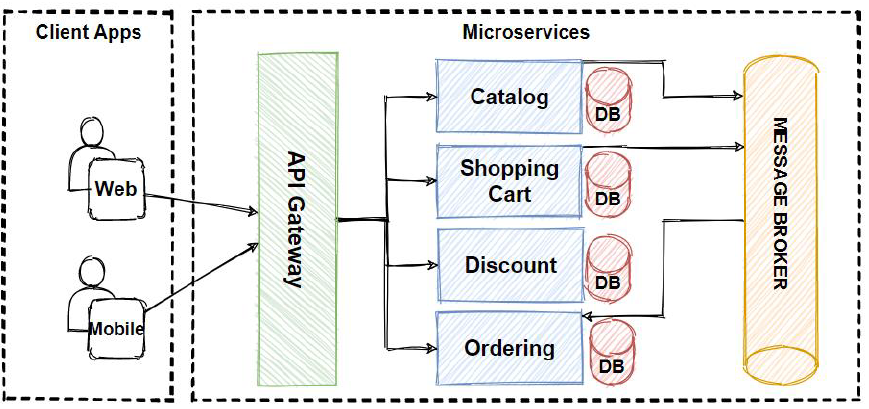
When building **Java REST API**s or **Java Microservices**, securing data in transit is non-negotiable. While we often rely on reverse proxies (like Nginx) or **Kubernetes Java** Ingress controllers to handle SSL termination, there are scenarios where end-to-end encryption is required, or where the Java application acts as a client consuming other secure services.
Developers often make the mistake of disabling SSL verification in development environments to avoid certificate errors. This creates a disparity between dev and prod, leading to “deployment surprises.” Instead, you should configure your **Java Build Tools** (like **Java Maven** or **Java Gradle**) and your local environment to trust self-signed certificates or local CAs properly.
Here is how you can configure a modern `HttpClient` (introduced in Java 11) to use a custom `SSLContext`. This ensures that your **Java Backend** communicates securely, even internally.
import javax.net.ssl.SSLContext;
import javax.net.ssl.TrustManagerFactory;
import java.io.FileInputStream;
import java.net.URI;
import java.net.http.HttpClient;
import java.net.http.HttpRequest;
import java.net.http.HttpResponse;
import java.security.KeyStore;
import java.time.Duration;

public class SecureHttpClientFactory {

    public HttpClient createSecureClient(String trustStorePath, String trustStorePassword) {
        try {
            // Load the TrustStore
            KeyStore keyStore = KeyStore.getInstance(KeyStore.getDefaultType());
            try (FileInputStream fis = new FileInputStream(trustStorePath)) {
                keyStore.load(fis, trustStorePassword.toCharArray());
            }

            // Initialize TrustManagerFactory with the KeyStore
            TrustManagerFactory tmf = TrustManagerFactory.getInstance(TrustManagerFactory.getDefaultAlgorithm());
            tmf.init(keyStore);

            // Create SSLContext using TLS v1.3
            SSLContext sslContext = SSLContext.getInstance("TLSv1.3");
            sslContext.init(null, tmf.getTrustManagers(), new java.security.SecureRandom());

            // Build the HttpClient
            return HttpClient.newBuilder()
                    .sslContext(sslContext)
                    .connectTimeout(Duration.ofSeconds(10))
                    .build();

        } catch (Exception e) {
            throw new RuntimeException("Failed to create secure HTTP client", e);
        }
    }

    public void callSecureEndpoint(HttpClient client, String url) {
        HttpRequest request = HttpRequest.newBuilder()
                .uri(URI.create(url))
                .GET()
                .build();

        client.sendAsync(request, HttpResponse.BodyHandlers.ofString())
                .thenApply(HttpResponse::body)
                .thenAccept(System.out::println)
                .join(); // Block for demonstration
    }
}
Modern Java Networking
This example leverages **Java Async** capabilities via `CompletableFuture` (returned by `sendAsync`). This is vital for **Java Scalability** in high-throughput microservices. By enforcing TLS 1.3, we ensure we are using the most secure protocols available, avoiding the vulnerabilities of older SSL versions.

Section 3: Authentication and Authorization with Spring Security
In the realm of **Java Frameworks**, Spring Security is the de facto standard. It provides comprehensive support for authentication, authorization, and protection against common exploits. For modern **Android Development** backends or Single Page Applications (SPAs), stateless authentication using **JWT Java** (JSON Web Tokens) is the preferred architectural pattern.
Implementing **OAuth Java** flows or JWT validation requires careful configuration of the `SecurityFilterChain`. A common pitfall is leaving endpoints exposed or misconfiguring Cross-Origin Resource Sharing (CORS).
The following example demonstrates a **Spring Boot** configuration that sets up a stateless security filter chain, mandates authentication for specific paths, and integrates a custom JWT filter. It utilizes **Java Lambda** expressions for cleaner configuration syntax.
import org.springframework.context.annotation.Bean;
import org.springframework.context.annotation.Configuration;
import org.springframework.security.config.annotation.web.builders.HttpSecurity;
import org.springframework.security.config.annotation.web.configuration.EnableWebSecurity;
import org.springframework.security.config.http.SessionCreationPolicy;
import org.springframework.security.web.SecurityFilterChain;
import org.springframework.security.web.authentication.UsernamePasswordAuthenticationFilter;

@Configuration
@EnableWebSecurity
public class SecurityConfig {

    private final JwtAuthenticationFilter jwtAuthFilter;

    public SecurityConfig(JwtAuthenticationFilter jwtAuthFilter) {
        this.jwtAuthFilter = jwtAuthFilter;
    }

    @Bean
    public SecurityFilterChain securityFilterChain(HttpSecurity http) throws Exception {
        http
            // Disable CSRF for stateless APIs
            .csrf(csrf -> csrf.disable())

            // Configure Session Management to be Stateless
            .sessionManagement(session ->
                session.sessionCreationPolicy(SessionCreationPolicy.STATELESS)
            )

            // Define Authorization Rules
            .authorizeHttpRequests(auth -> auth
                .requestMatchers("/api/v1/auth/**").permitAll() // Public endpoints
                .requestMatchers("/api/v1/admin/**").hasRole("ADMIN") // Role-based access
                .anyRequest().authenticated() // Secure everything else
            )

            // Add JWT Filter before the standard authentication filter
            .addFilterBefore(jwtAuthFilter, UsernamePasswordAuthenticationFilter.class);

        return http.build();
    }
}
Defensive Coding with Streams and Optionals
When processing the JWTs or user roles within your business logic, leverage **Java Streams** and **Java Generics** to write clean, defensive code. Avoiding `NullPointerException` is a security concern because unhandled exceptions can lead to Denial of Service (DoS) or information leakage via stack traces.
import java.util.List;
import java.util.Optional;

public class AccessControlService {

    public boolean hasPermission(User user, String requiredPermission) {
        return Optional.ofNullable(user)
                .map(User::getRoles)
                .orElse(List.of()) // Return empty list if roles are null
                .stream()
                .flatMap(role -> role.getPermissions().stream())
                .anyMatch(permission -> permission.getName().equals(requiredPermission));
    }
}
Section 4: Infrastructure Security and Best Practices
Writing secure code is only half the battle. The environment in which your code runs—whether it’s **AWS Java**, **Azure Java**, or **Google Cloud Java**—must be hardened. This brings us back to the concept of environment parity.
Containerization and Egress Control
When packaging your application using **Docker Java** best practices, never run your application as the root user. If an attacker compromises your application via a vulnerability (like Log4Shell), running as root gives them unrestricted access to the container filesystem. Furthermore, implement egress control. Your **Java Database** connection pool should only be able to talk to the database IP, not the open internet.
Dependency Management
The supply chain is a major attack vector. Use **Java Maven** or **Java Gradle** plugins like OWASP Dependency-Check to scan your `pom.xml` or `build.gradle` for known vulnerabilities (CVEs). Keep your dependencies updated, including **Hibernate**, **Spring**, and logging frameworks.
Injection Prevention
Despite the prevalence of ORMs like **JPA** and **Hibernate**, SQL injection remains a threat, particularly when developers resort to native queries. Always use parameterized queries. This applies to NoSQL databases as well.
// BAD PRACTICE: Vulnerable to SQL Injection
String query = "SELECT * FROM users WHERE username = '" + username + "'";

// GOOD PRACTICE: Using JDBC PreparedStatement
String query = "SELECT * FROM users WHERE username = ?";
PreparedStatement pstmt = connection.prepareStatement(query);
pstmt.setString(1, username);
ResultSet results = pstmt.executeQuery();
Conclusion
Mastering **Java Security** is a continuous journey that spans from the intricacies of **JVM Tuning** and **Garbage Collection** (ensuring sensitive data doesn’t linger in memory) to high-level architectural decisions in **Java Cloud** deployments. By integrating security into your **CI/CD Java** pipelines and ensuring your development environment mimics production constraints—including network segmentation and TLS—you reduce the risk of vulnerabilities slipping through.
As you move forward, explore advanced topics like **Java Modules** (Project Jigsaw) to encapsulate internal APIs and reduce the attack surface. Remember, in the world of **Java Engineering**, security is not a feature; it is the foundation upon which reliable, scalable, and trustworthy applications are built. Whether you are doing **Android Java** development or building massive **Java Enterprise** systems, the code you write today defines the security posture of tomorrow.